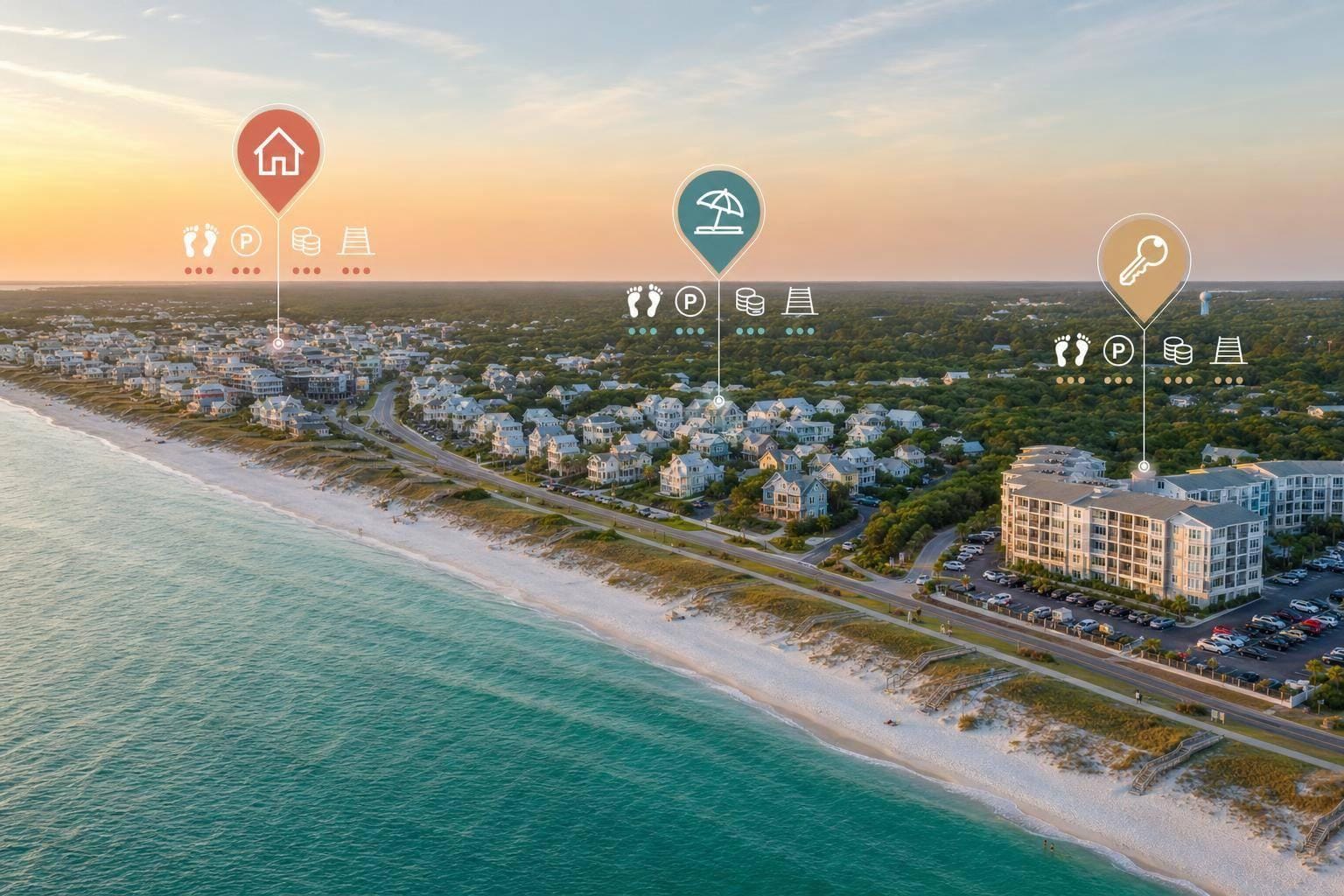
The right 30A home starts with location, not finishes. I’d match the area to how I plan to use the home, then check beach access, walkability, noise, parking, and total monthly cost before I tour anything.
Here’s the short version:
- If I want a primary home, I’d focus on commute routes, groceries, medical care, and quieter streets
- If I want a vacation home with some rentals, I’d look for short beach access and some walkability, but outside the busiest cores
- If I want a rental-first property, I’d put guest-friendly beach access, walkable dining, parking, and known 30A areas at the top of my list
- On 30A, 58 public beach access points can make “near the beach” mean very different things in practice
- Median sale price on 30A is about $1.55 million, while walkable homes near beach access often run $1.5 million to $3.5 million
- Flood insurance can range from about $400 to $15,000+ per year, depending on flood zone
A simple way I’d narrow the search:
| Use goal | What I’d prioritize | Main tradeoff |
|---|---|---|
| Full-time living | Daily function and easier driving | Less beach walkability |
| Personal use + some rentals | Beach access plus calmer streets | Higher cost for that mix |
| Rental-first | Guest appeal and walkability | Less privacy in busy weeks |
Before I tour, I’d time the walk to the beach, test parking, check road crossings, and stand outside at different times of day. On 30A, a house can look perfect online and still be wrong for the way I’d use it.
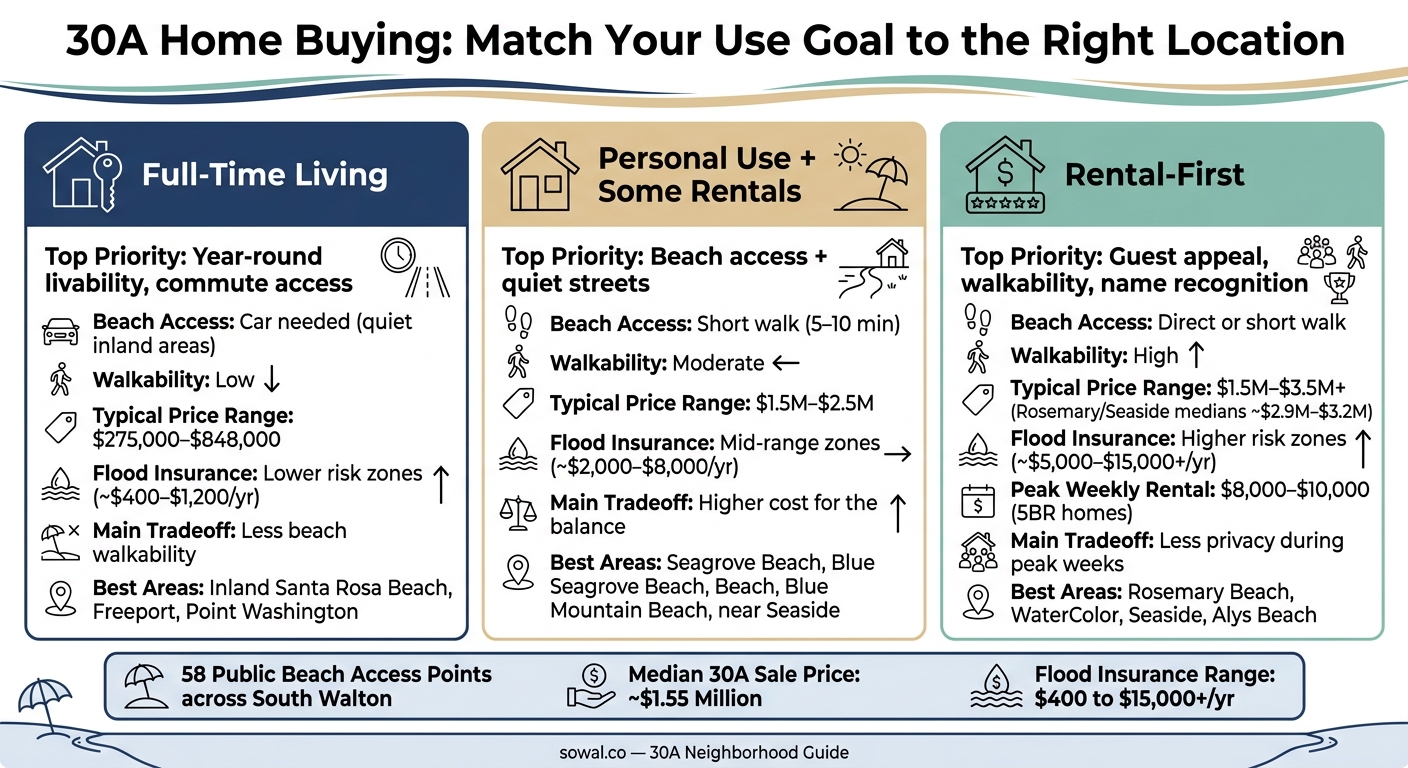
30A Home Buying: Match Your Use Goal to the Right Location
Buying a Home on 30A? 5 Questions to Work Through First
Step 1: Define Your Use Goal
Start with your use goal, not the square footage or the finishes. That one decision will narrow the 30A areas that make sense. From there, you can compare public vs. private beach access, walkability, and what day-to-day trips will look like.
Primary Residence or Frequent Owner Use
If you expect to live here most of the year, or use the home often for long stays, year-round function matters more than beach-front convenience.
That shifts the way you judge location. You’re not just thinking about pretty streets or how close the sand is. You’re also thinking about commute routes to Destin, Miramar Beach, or Panama City Beach, plus access to US-98, grocery stores, and medical offices. For full-time living, quieter inland or bay-side spots can be a better fit.
If the home will only be part-time, the location test looks different.
Vacation Home With Occasional Rentals
For a lot of buyers, this is the middle lane on 30A. You want a place that feels like your getaway when you’re there, but still works for guests when you’re not.
That usually points to homes with good beach access and some walkability, but on calmer streets just outside the busiest village centers. In many cases, being close enough to bike to Seaside or Rosemary Beach hits that sweet spot. The big point here is simple: don’t give up your own enjoyment just to chase rental demand.
Rental-First Ownership
If rental income comes first, your location choice should follow what guests care about most: easy beach access, walkable dining, and simple parking.
Name recognition matters too. Places like Rosemary Beach, WaterColor, and Seaside can help with bookings because guests often search by neighborhood name. In peak season, five-bedroom homes in walkable communities can command $8,000–$8,000–$10,000 per week.0,000 per week, depending on seasonal occupancy trends.
These three owner profiles can help you trim the shortlist fast.
| Use Goal | Main location priority | Main tradeoff |
|---|---|---|
| Full-time living | Year-round livability, commute access | Less walkability to the beach |
| Personal use + occasional rental | Beach access + quiet streets | Higher price for the balance |
| Rental-first | Guest appeal, name recognition, walkability | Less personal comfort during peak weeks |
Once your use goal is clear, the next step is to compare areas by beach access, walkability, and your daily trip routine.
Step 2: Match Beach Access, Walkability, and Trip Style
Once you know why you're buying, the next filter is simple: what will the day-to-day feel like for you and your guests? That usually comes down to beach access, how much walking or biking you want to do, and whether the area fits the way people actually spend their time.
Direct Access, Short Beach Walkovers, or Public Access Nearby
South Walton has 58 public beach access points across the county, including nine regional access points with parking, restrooms, showers, bike racks, and ADA-friendly features. So the big issue isn't just near or far. It's whether the route to the beach is flat, safe, and easy when you're hauling chairs, towels, and a cooler.
For families with small kids or older travelers, that can make a big difference. A neighborhood beach walkover with no stairs and no road crossing is often much easier than a slightly shorter route that's awkward or tiring. Regional access points like Dune Allen and Ed Walline also come with more parking and more on-site features, which can help when guests drive in or need ADA access.
Then comes the part people sometimes miss: beach access is only half the story. You also want the area to fit the kind of beach day your group tends to have.
Car-Light Stays Versus Quiet Residential Areas
Walkable hubs like Seaside and Alys Beach put coffee, dinner, and beach access within about a 5- to 10-minute walk or bike ride. That's a strong fit for guests who want to park once and spend the rest of the trip on foot or on bikes.
But there are tradeoffs. These areas often bring:
- More foot traffic
- More evening noise
- Tighter parking
- Higher prices tied to demand for walkability
Quieter residential pockets, like inland streets in Santa Rosa Beach or Blue Mountain Beach, feel more like neighborhoods and usually come with less congestion. The catch is simple: most meals out, shopping, and nightlife will mean getting in the car.
A good gut-check helps here. If your group heads out for coffee in the morning, shops in the afternoon, and dinner at night, a walkable hub usually makes more sense. If the trip is more about cooking at home and making one outing a day, a quieter area is often the better fit.
Once you've sorted out how much car-free ease you want, the next step is to line that up with your daily routine.
Match the Area to Your Typical Trip Routine
Think through a normal vacation day or use an itinerary generator to map out your stay. Not the ideal one - the one your group actually has.
Morning beach walks or runs work better in spots with a short, safe route to the sand, with few traffic crossings and decent lighting. Midday breaks with young kids are much easier when the home is less than a 10-minute walk from the water, so lunch and naps don't turn into a whole production. And sunset walks? People do them far more often when beach access is close and easy. Most tired families aren't going to load up the car for a quick stroll.
Bike access matters too. Being near the Timpoochee Trail along 30A can make a big difference because it links communities and gives casual riders and kids a way to stay off the main road. For longer stays, it's also smart to look at nearby shops and indoor activities, since not every day is a full beach day.
After you know which access style fits your routine, you can start shaping your budget around it.
Step 3: Set a Budget Around Location Tradeoffs
Once you know how you want to access the beach, put a dollar figure on that choice. If your routine depends on beach access or easy walkability, build that premium into your budget before you start touring homes.
That matters on 30A because the spot that fits your trip style can come with a much higher price tag. And it’s not just the purchase price. Location shapes day-to-day living and what you’ll keep paying after closing.
What You Pay More for on 30A
On 30A, the median sale price is about $1.55 million. Walkable non-Gulf-front homes, usually one to three blocks from beach access, often land in the $1.5 million to $3.5 million range. In high-demand communities, the numbers climb even more. Rosemary Beach and Seaside medians are often cited around $2.9 million to $3.2 million.
Then come the carrying costs, and this is where the gap can get big fast. Flood insurance premiums can range from $400 to $1,200 in Zone X, $2,000 to $8,000 in Zone AE, and $5,000 to $15,000+ in Zone VE, before you even add homeowners and wind coverage. On Gulf-front properties, combined flood and homeowners coverage can tack on thousands to tens of thousands of dollars per year.
HOA dues can push the monthly total higher too. In resort-style, Gulf-adjacent, or condo communities, HOA fees often run $300 to $800+ per month. Those dues may include exterior insurance, common-area upkeep, and beach-access features. The key is simple: make sure you’d use what you’re paying for.
Where Compromise Makes Sense
Buying inland usually cuts both the purchase price and the carrying costs, but you give up some convenience and add more driving. In inland Walton County, including places like Freeport and inland Santa Rosa Beach, typical sale prices for single-family homes have been reported in the $275,000 to $425,000 range. Even across the broader Santa Rosa Beach area, values often cluster around $613,000 to $848,000, which is still well below the Gulf-front tier.
For a full-time resident focused on schools, groceries, and commuting, that tradeoff can be easy to justify. For someone buying with rentals in mind, it gets a bit more complicated. Guests often care more about beach access and town access than owners first assume.
A simple way to sort this out is to compare the full monthly carrying cost across two or three locations before you tour. Look at the mortgage, taxes, HOA, and insurance side by side. That kind of check makes the tradeoff plain: a few blocks, or a few miles, can shift monthly costs by hundreds or even thousands of dollars. Those numbers can help you decide which areas deserve a closer look.
Step 4: Compare 30A Areas and Tour With a Location Checklist
Take your use goal, access needs, and budget, then turn them into a short list of area types before you start touring homes.
At this stage, the job is simple: narrow 30A down to a few area types that match how you plan to live in the home.
30A Location Fit Comparison Table
Use this table as a quick filter for broad 30A area types. It’s not the final call, but it can shrink your list fast.
| Area Type | Beach Access | Walkability | Rental Appeal | Quietness | Budget Tier | Best Fit |
|---|---|---|---|---|---|---|
| Walkable Village Hub (Seaside, WaterColor, Rosemary Beach, Alys Beach, Seacrest) | Short walk | High | High | Lively | Highest | Vacation home or rental-first |
| Gulf-Front Premium | Direct or nearly direct | Moderate (varies) | High | Moderate | Premium | Hybrid or rental-first |
| Mixed Neighborhood (parts of Seagrove) | Short walk | Moderate | Medium | Moderate | Moderate | Balanced owner/rental use |
| Quiet Residential Area (Blue Mountain back streets, Point Washington, other back streets) | Car needed | Low | Low | Very quiet | Lower | Primary residence or frequent owner use |
Use the table as a first pass. Beach access can look great online, then feel very different once you factor in parking, gates, and the actual walking route.
Once you’ve picked the area type that seems like the best match, go test it in person.
Tour-Day Checklist for Location Decisions
When you visit a neighborhood, check the things that listing photos and map pins tend to hide. Walk the full route to the beach at a normal pace and time it. Pay attention to road crossings, stairs, and uneven paths. Those details matter if you have kids, older guests, or you’re carrying chairs, coolers, and bags.
Then drive to the nearest public beach access during a busy time, like late morning or late afternoon. See how parking works in real life by checking the top parking spots near 30a beaches.
If you can, stand outside the property at different times of day. Morning noise and evening noise are not the same thing. Near village centers, bars, live music, traffic, and foot traffic can pick up fast.
Also check the multi-use path, the Timpoochee Trail, and ask yourself if it feels comfortable for biking with kids. Then ask one last question: does this location still fit your use goal during peak season?
Conclusion: Narrow Your Search Before You Tour Homes
The best way to find the right 30A home is to work backward from how you’ll actually use it. Start with your use goal: primary residence, frequent owner use, or rental-first. Match that to the beach access and walkability your day-to-day routine calls for. Set your budget with location premiums in mind. Then use the comparison table to build a shortlist and verify each area on the ground before you get attached to one house.
Use sowal.co to review neighborhood character, beach access, and local trip patterns before you tour.
FAQs
Which 30A area best fits my use goals?
Start with your top priority: rental income, walkability, privacy, nature, or budget.
If rental income and easy access to shops, dining, and the beach sit at the top of your list, East 30A is often the best fit. That includes Seaside, Rosemary Beach, and WaterColor. These areas tend to draw buyers who want to be in the middle of the action, which can make them a strong match for short-term rentals and car-light living.
If you care more about privacy and a tucked-away feel, WaterSound Beach and Alys Beach are better options. They’re known for a more exclusive atmosphere and a bit more breathing room.
For a quieter pace and more of a nature-first setting, look at Blue Mountain Beach, Dune Allen Beach, and Grayton Beach. These spots tend to feel calmer and less busy, which appeals to buyers who want room to slow down.
If budget matters most, or you’re planning for full-time living instead of a pure vacation home, North Santa Rosa Beach and Watersound Origins are often more approachable.
How much should I budget for location-related costs?
Budget for more than the purchase price. Where the home sits can change your costs year after year. Beachfront homes often come with higher bills, mostly because taxes, insurance, and upkeep tend to be steeper.
Here’s what to factor in:
- Property taxes: about 1%–1.5%
- HOA fees: about $200 to $2,500+ per month
- Insurance: about $8,000–$15,000 a year, plus $1,500–$3,000 for flood insurance
- Maintenance: about 1%–2% of the home’s value each year
- Closing costs: about 2%–5%
What should I check before touring a 30A home?
Before you tour 30A homes, get mortgage pre-approval and set a clear budget. Make sure it covers PITI, insurance, maintenance, and any HOA fees.
Also check the details that can shape how you use the property day to day. That includes HOA rules, rental eligibility, beach access, flood zones, and coastal construction limits. Those factors can affect whether the home fits your goals, along with what you may spend over time on insurance and upkeep.